Case study · Product design + build
Reel
Release demos anyone on the team can make, from a sentence.
- Role
- Product designer, end to end (design and build)
- Platform
- Web app and Chrome extension
- Team
- Me, with Claude as my engineering partner
- Status
- Pre-launch, 2026
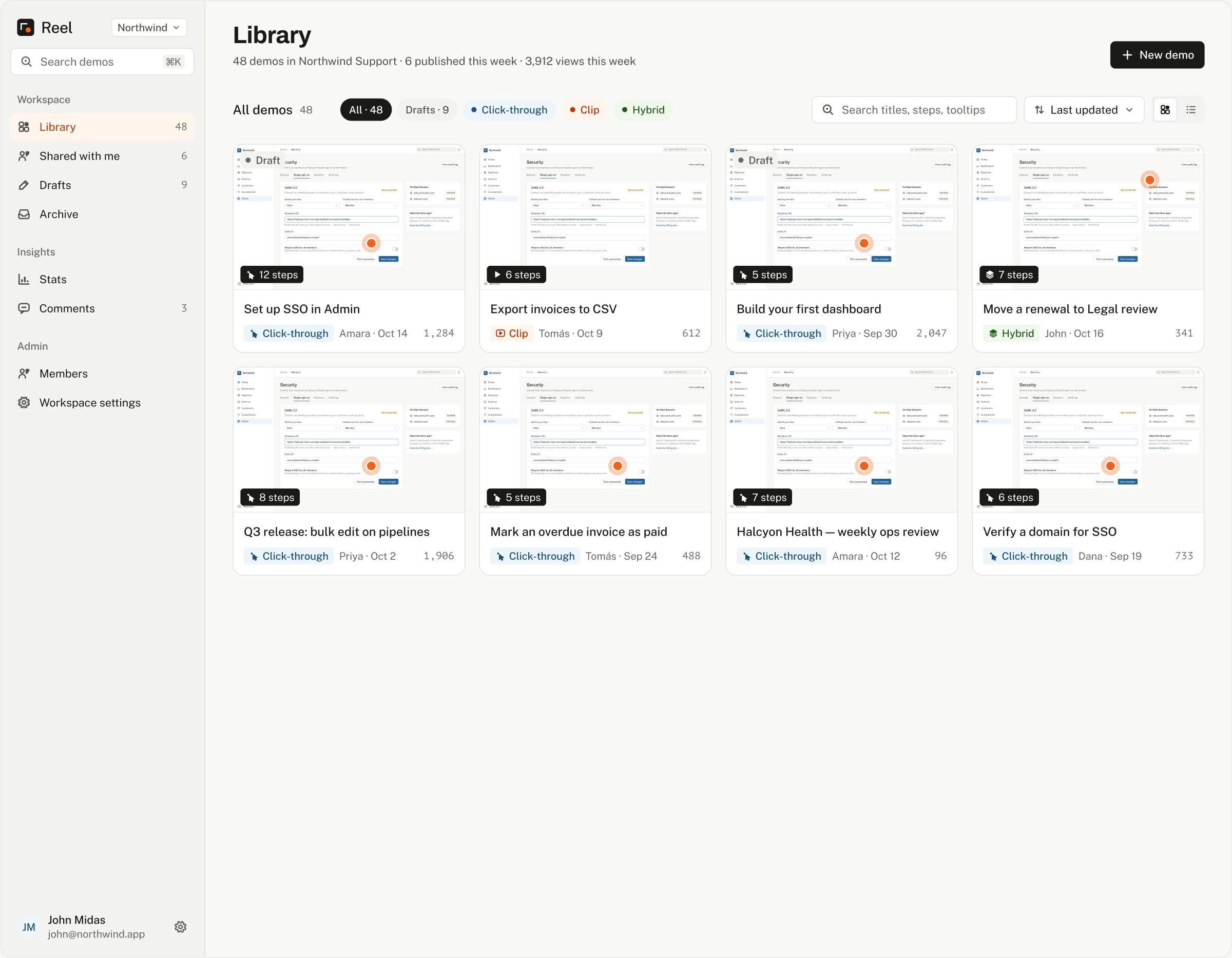
Overview
One tool for three kinds of demo
On a small team shipping across four connected products, a release could mean ten demos. Making them took one person who knew the tooling, and a lot of hand-holding for everyone else. I designed Reel so anyone on the team can turn “show how to turn on SSO” into a demo people can click through, watch, or both, and stay in control of what the AI makes.
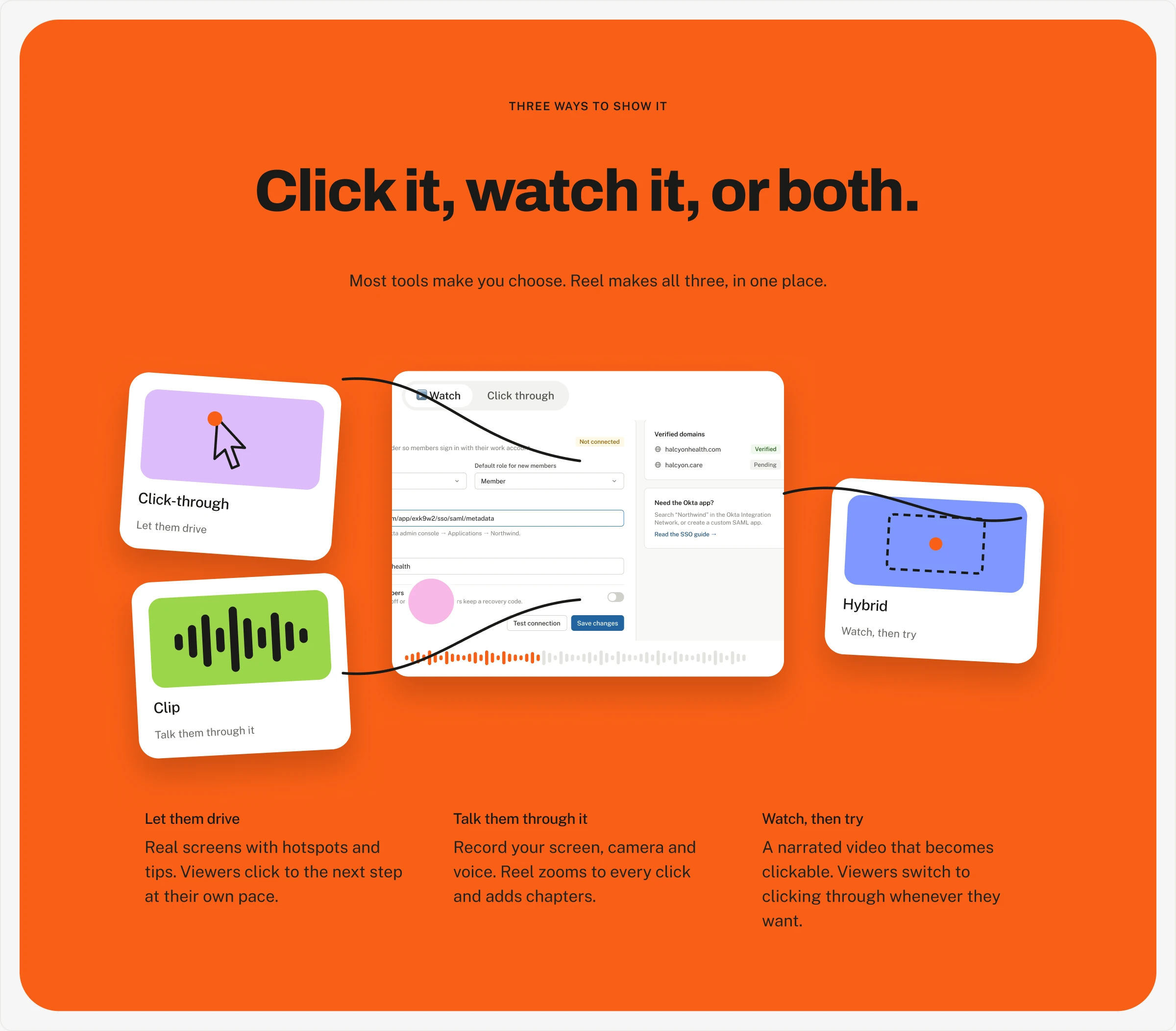
Click-throughs (real screens with hotspots and tips), clips (screen, camera and voice), and hybrids (a narrated video that viewers can switch to clicking through).
Where it started
Recording wasn't slow. Assembling was.
Where I worked, every release came with demos: one for each new feature, across four products that worked together. Some releases needed ten.
We connected Claude to automate parts of the workflow, and it helped, but it was a chain of tools held together by the few of us who understood it. Our less technical teammates, the people closest to customers, couldn't run it without someone sitting next to them.
The design goal
A non-technical teammate ships a release demo on their own, in minutes, and trusts what they're sending.
- 1
Start from what you want to show.
- 2
One thing in focus at a time.
- 3
AI output is always visible and editable.
Decision 1
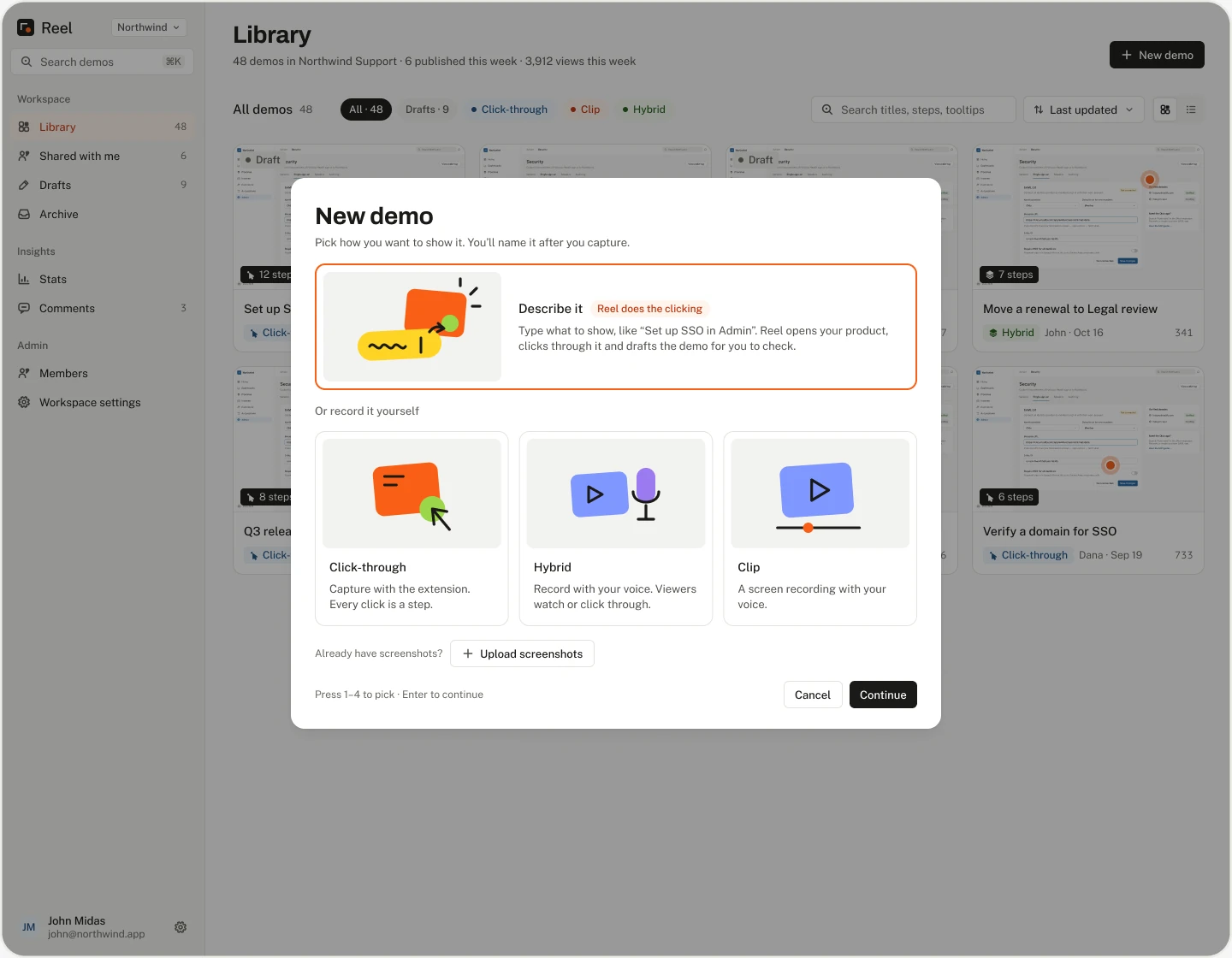
Describe it is the front door
New demo opens on Describe it, picked and featured above the other ways in. It's one field, with the product it'll run in and the runs left this month underneath.
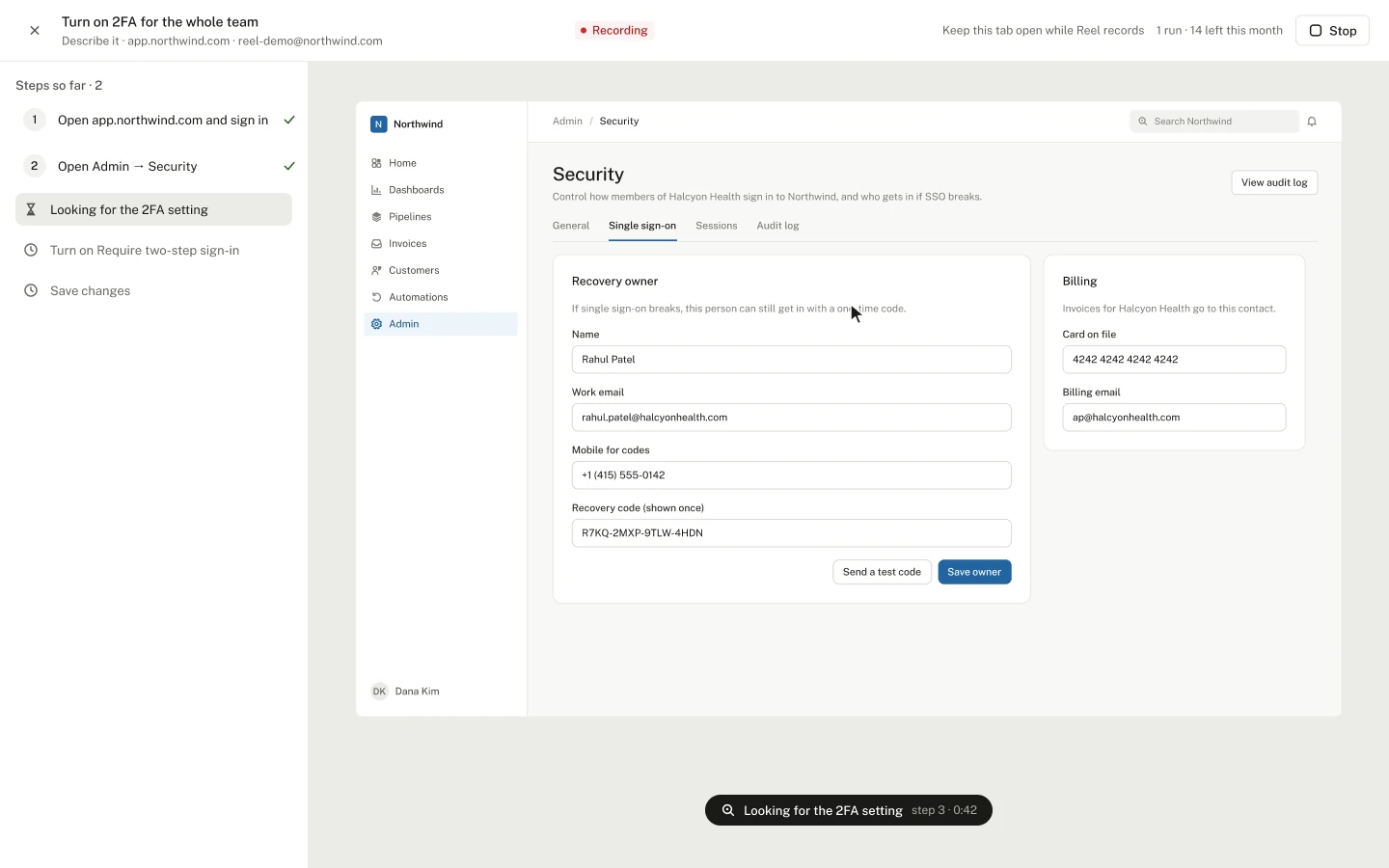
Once a run starts, the steps appear one by one as Reel records them, with what it's doing now and its guess at what comes next, beside a live view of the browser it's driving.
Decision 2
Review before anything goes out
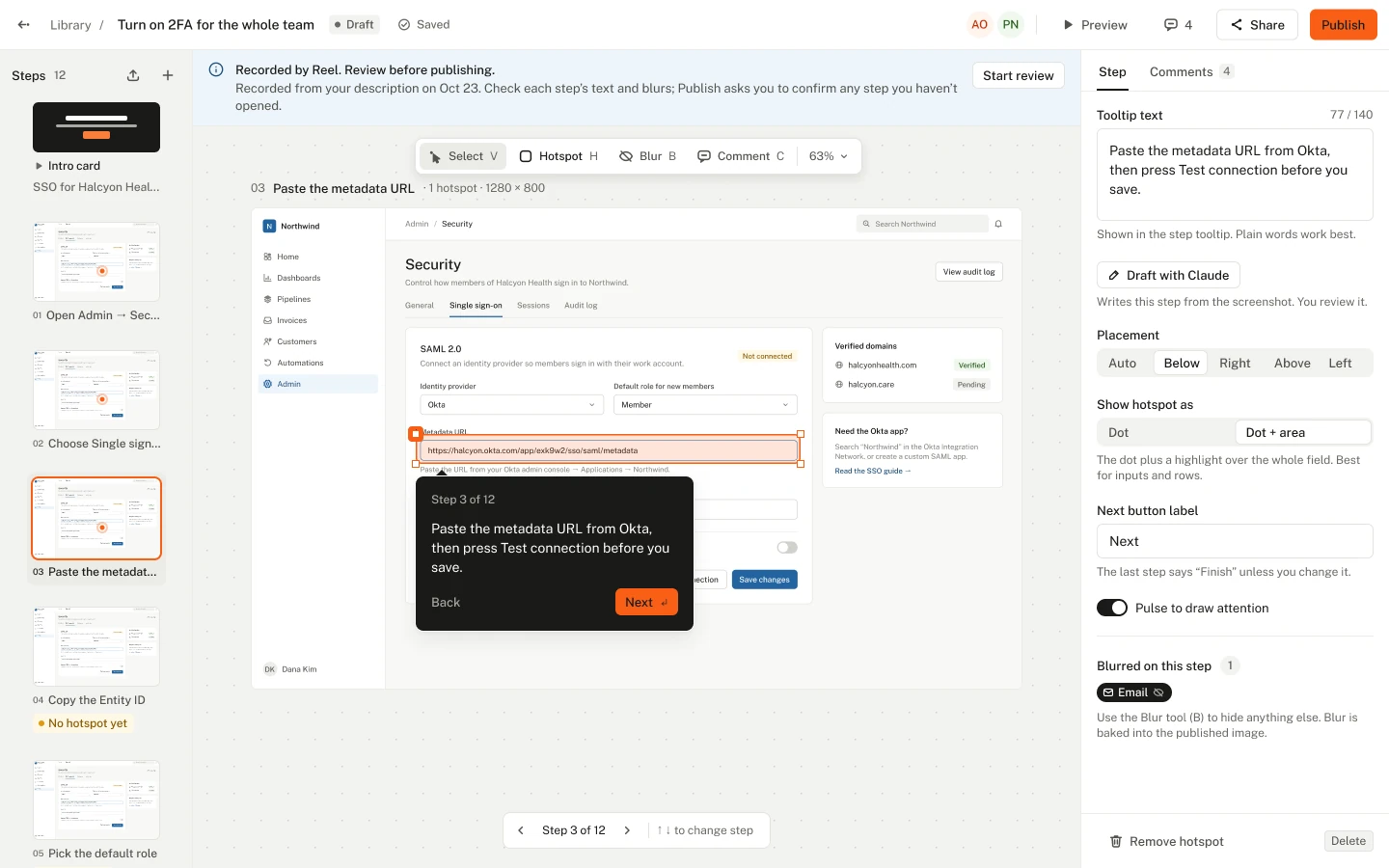
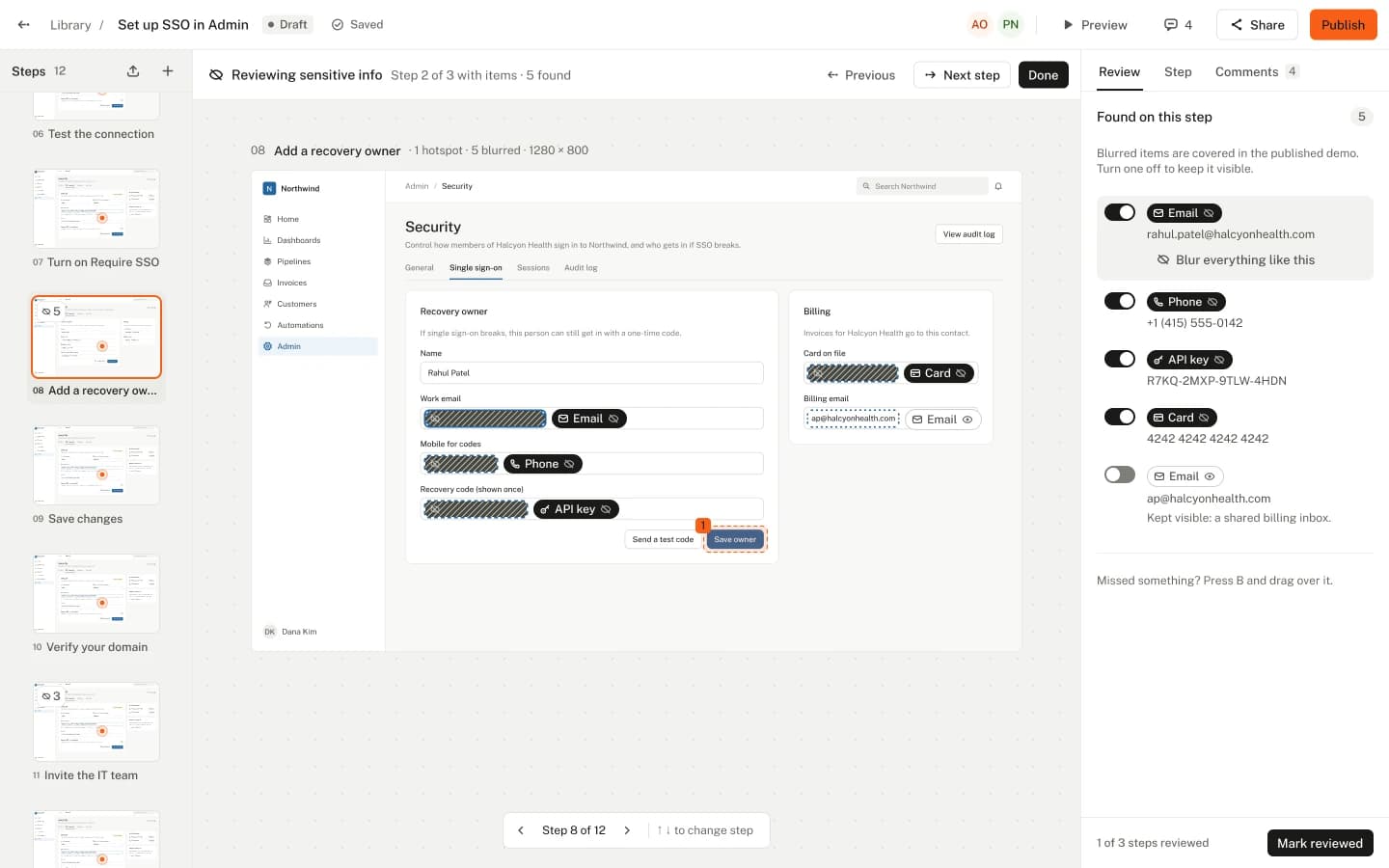
A demo Reel recorded opens with a “Recorded by Reel: review before publishing” strip and one button, Start review. Review walks only through what needs a person: every tooltip the AI wrote, and every spot where something private was blurred. Anything unchecked is listed first in the publish check.
Decision 3 · Before and after
The editor: from cockpit to canvas
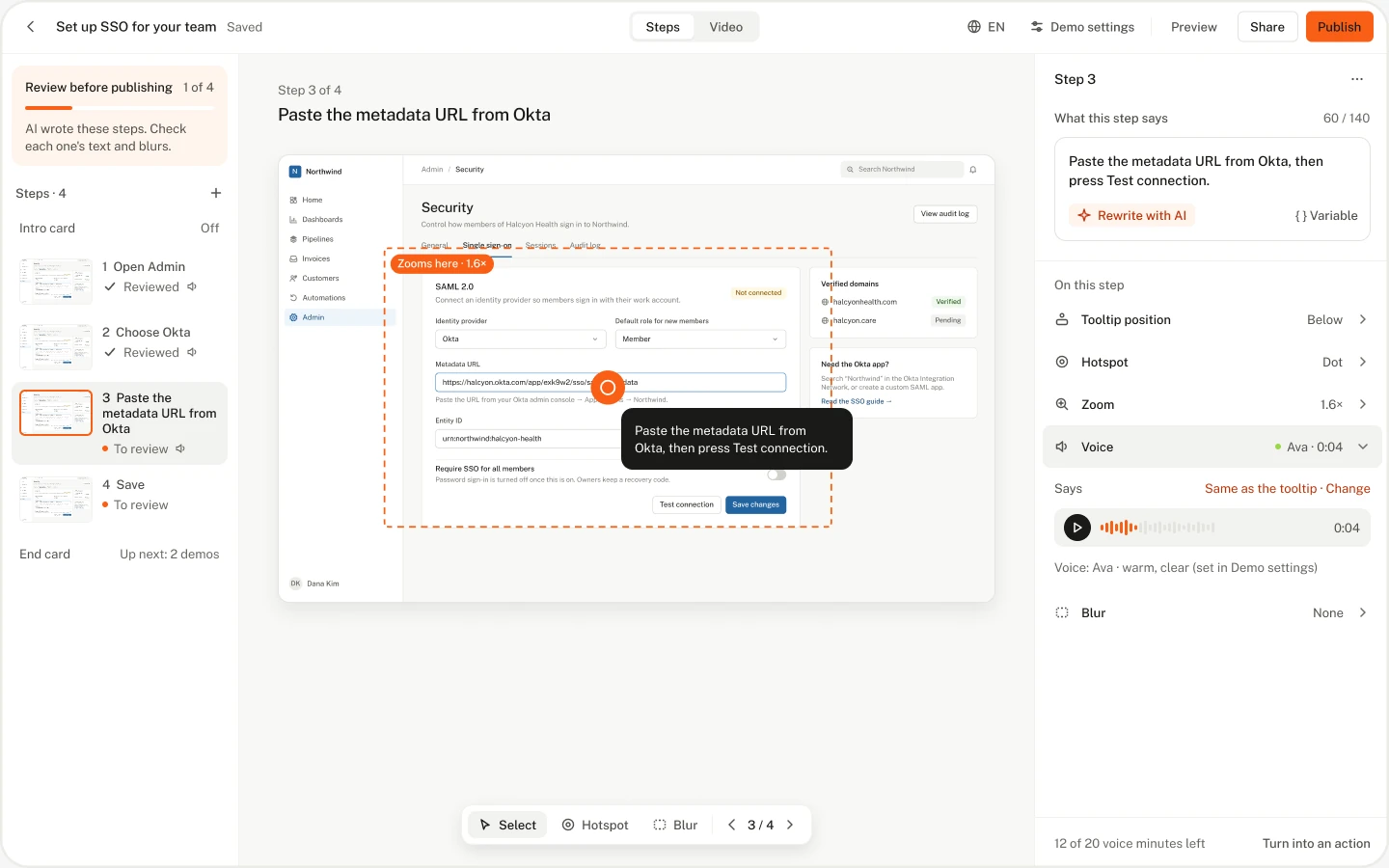
The first editor showed the step list, canvas, properties and timeline all at once. The redesign puts the canvas in the centre with a slim step rail, one panel for the selected step, and demo-wide settings in their own Demo settings panel. The timeline only appears in the Video tab.

Decision 4
One hotspot language
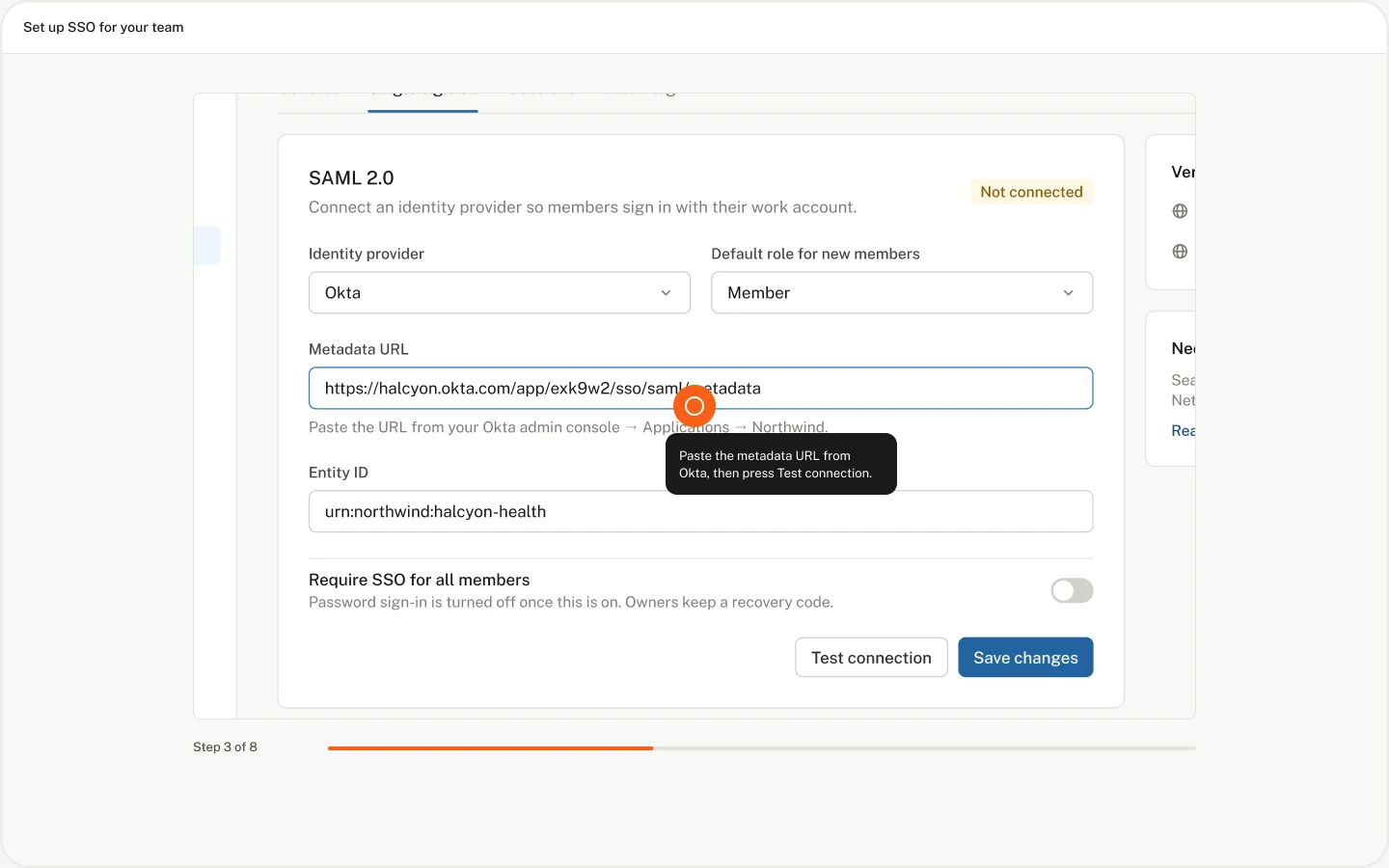
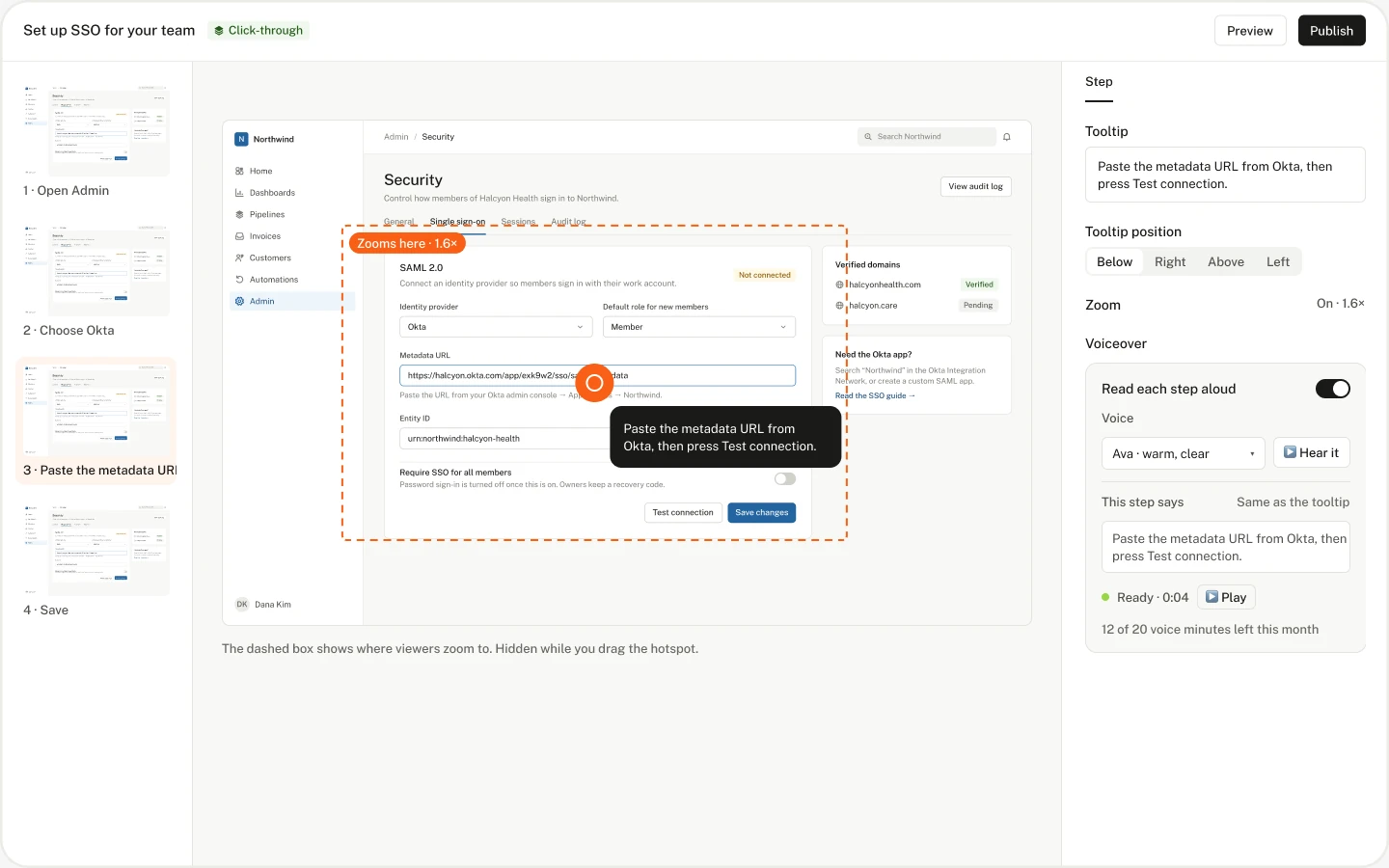
One hotspot: a ring with a soft halo, placed by the click itself. One dark tooltip, the same in light and dark mode, beside the target and never over it, with a 140-character limit. Auto zoom moves in on each click.

Decisions 5 and 6
Let the viewer choose: Watch or Click through
A hybrid opens on Watch, with a Watch / Click through switch above it. My first hybrid paused at each step and handed control to the viewer. So I split it into two clear modes: Watch plays straight through with the voice; Click through goes at the viewer's pace.

Decision 7
Voiceover without a separate tool
“Read each step aloud” speaks each step's tooltip, so editing the words is editing the voice. A step can have its own spoken line, and a changed step's voice is marked out of date. On plans without voiceover, the setting still shows with a note on which plans include it.

Making an AI safe to point at your product
Guardrails you can see while it runs
The AI never sees the password. Never-click words (Delete, Pay, Send) pause the run. A click that leaves the product is undone. Each move is checked before it happens. The maker is always one click from control: hint, 2FA code, Take over. Private details are blurred before upload. Nothing publishes itself.

Built for the follow-up
Comments at the exact moment
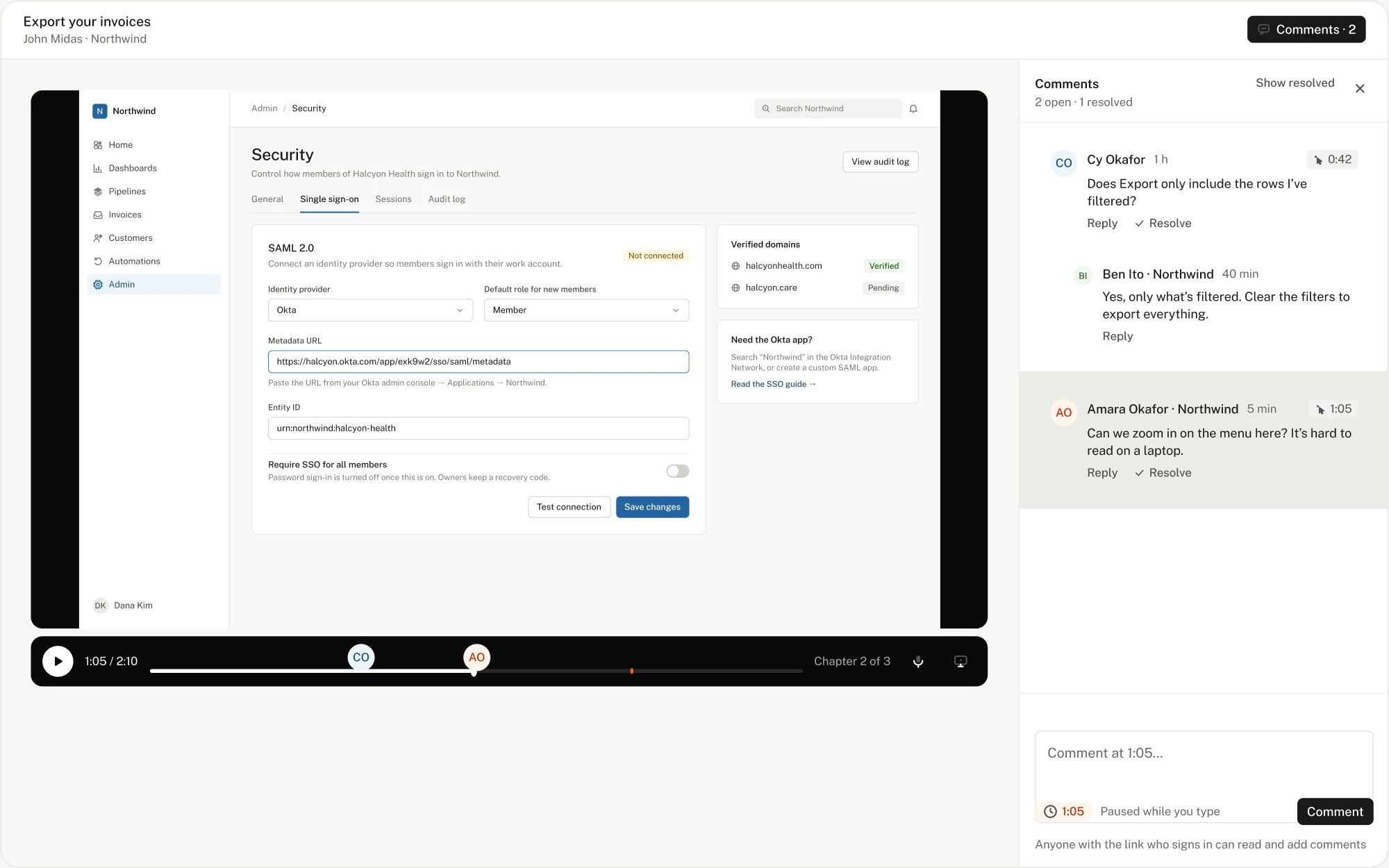
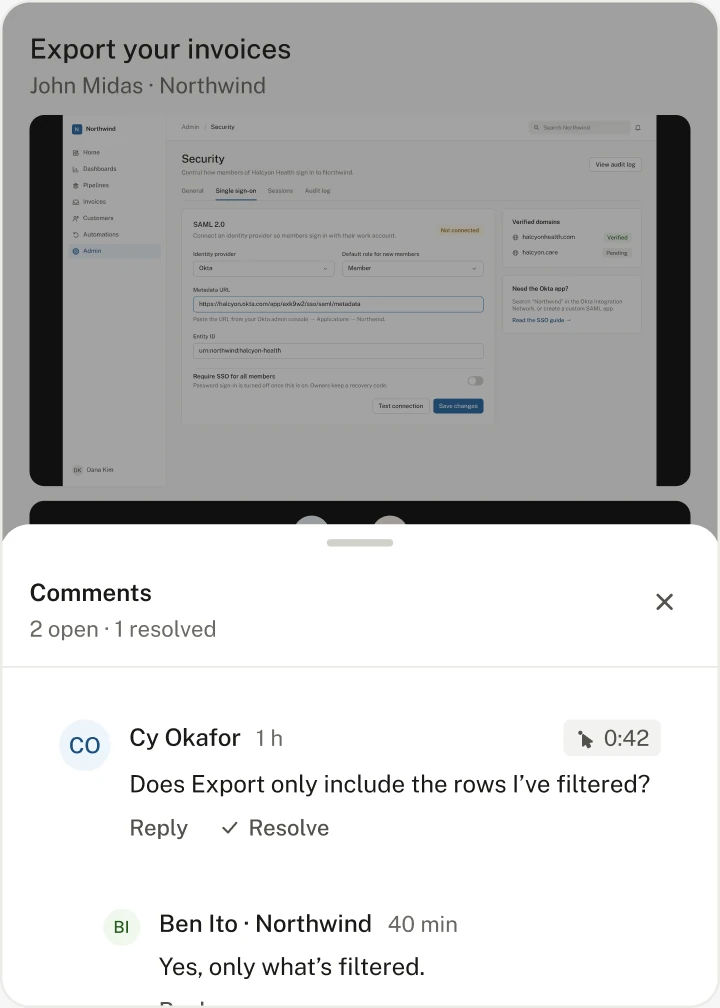
On clips and hybrids, a comment is pinned to a moment: clicking into the box pauses the video, and avatars sit on the timeline. Anyone with the link can sign in and comment; only the team resolves. On phones, comments open as a sheet. Stats show views, finish rate and drop-off by step.
Pricing that matches what the AI costs
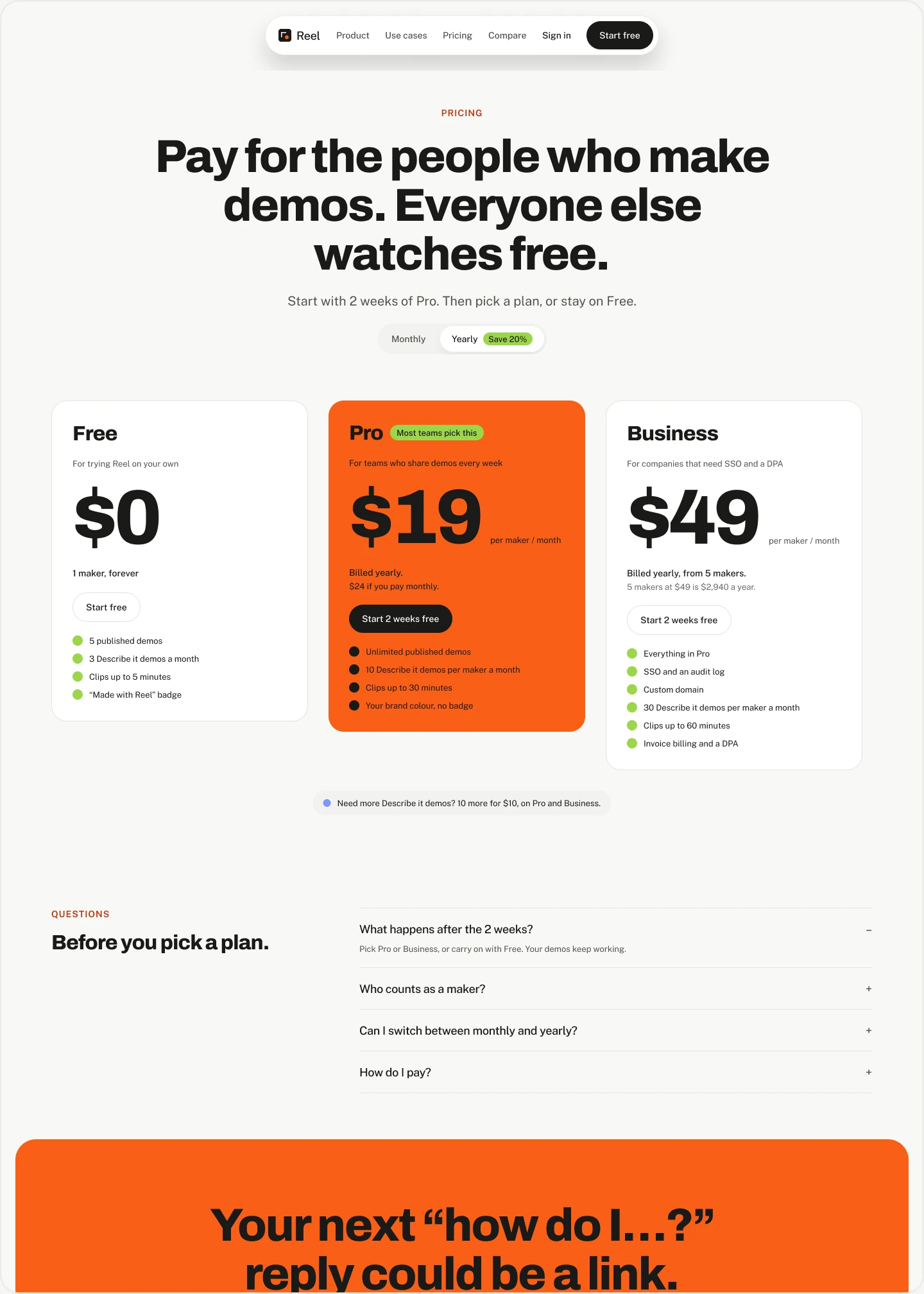
Only makers pay. Viewers and commenters are free.
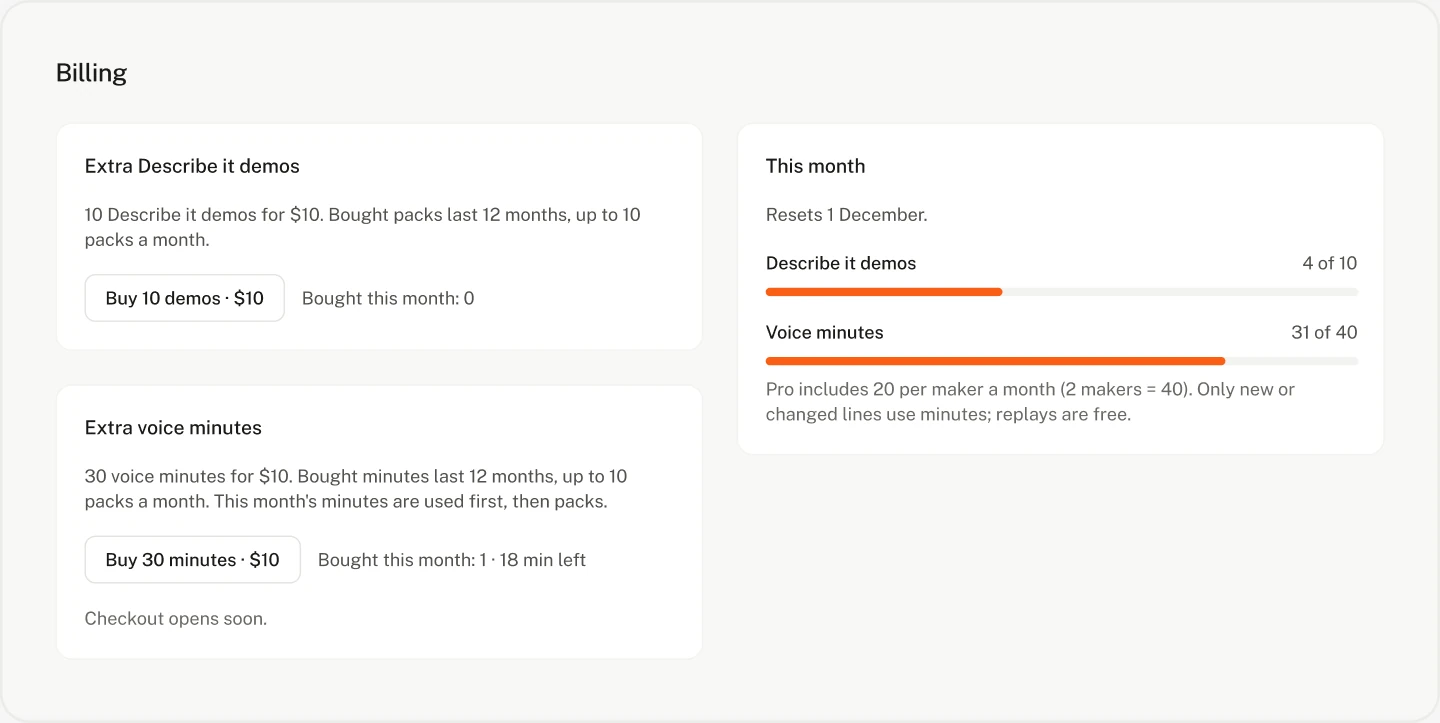
Free, Pro ($19 per maker a month, yearly) and Business ($49, from 5 makers). Extra AI in one currency: credits, 100 for $10. The two-week trial gives one maker's AI allowance for the whole workspace, however many people join.
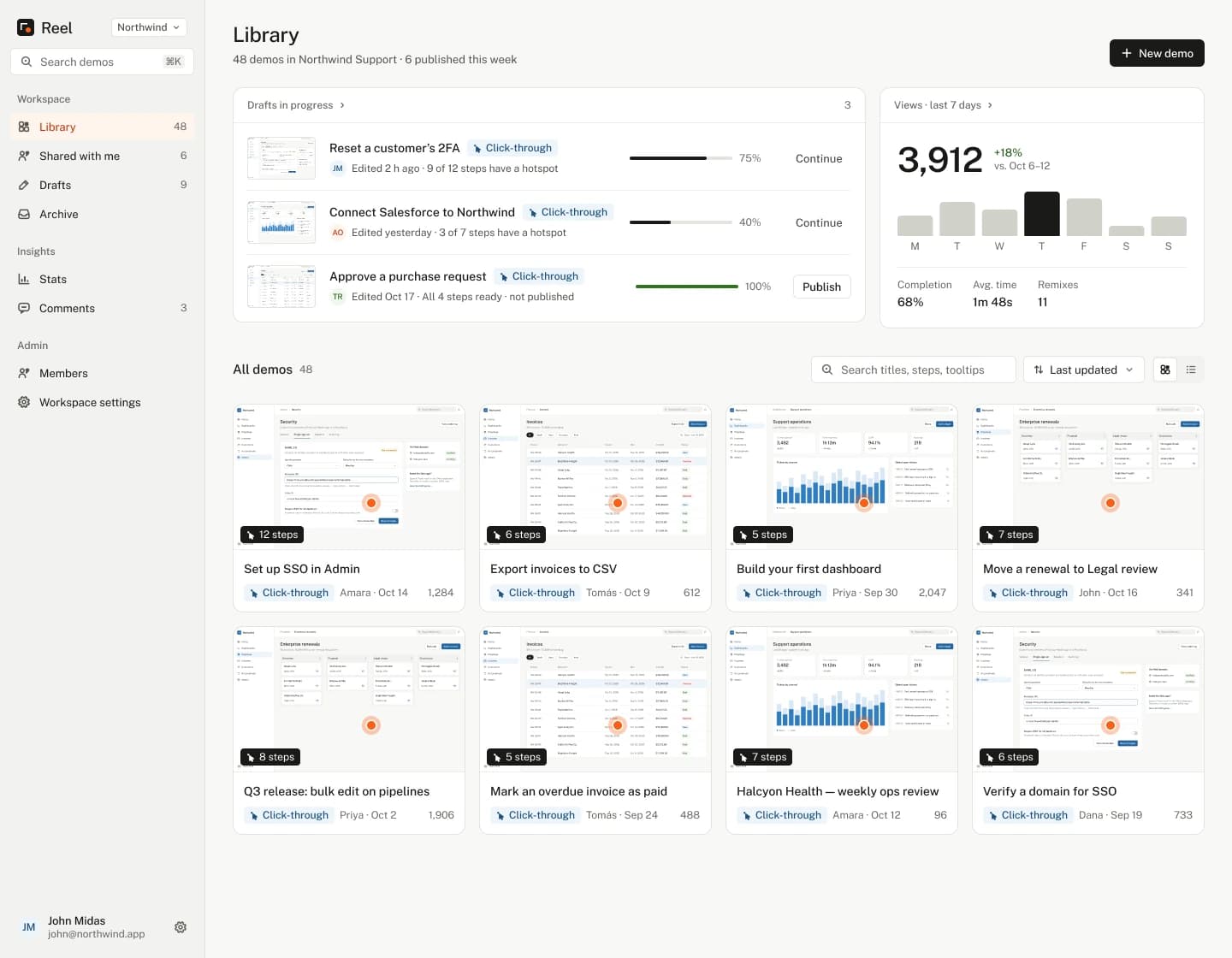
The visual redesign · Before and after
From flat and boxed-in to warm and clear
Problems: a flat type hierarchy, icon overload, borders everywhere, low-contrast greys, no personality. The fix: a clear type scale with a display face, spacing instead of borders, warm neutrals with one ember accent, and spot illustrations for empty states and first runs. The website carries the same look.
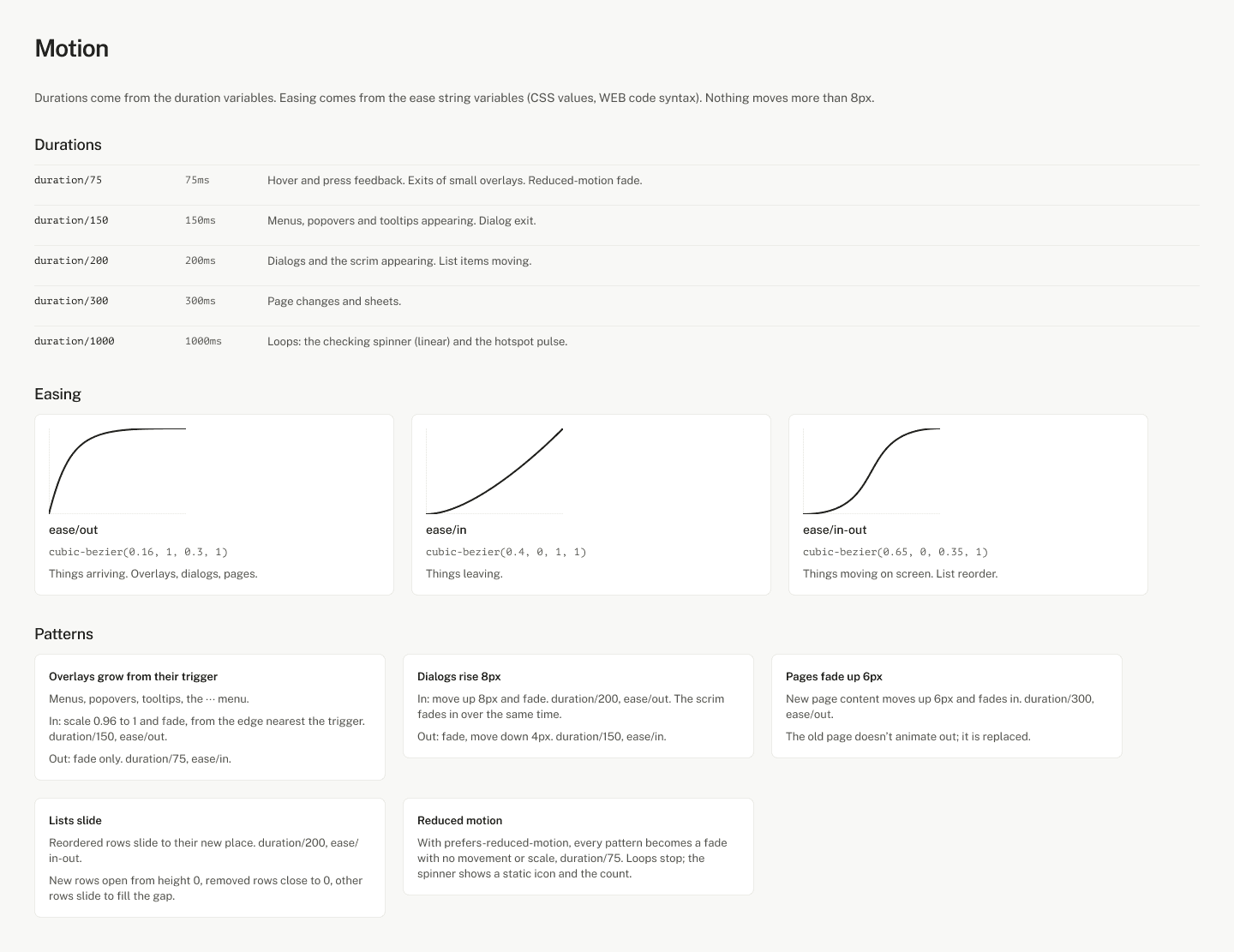
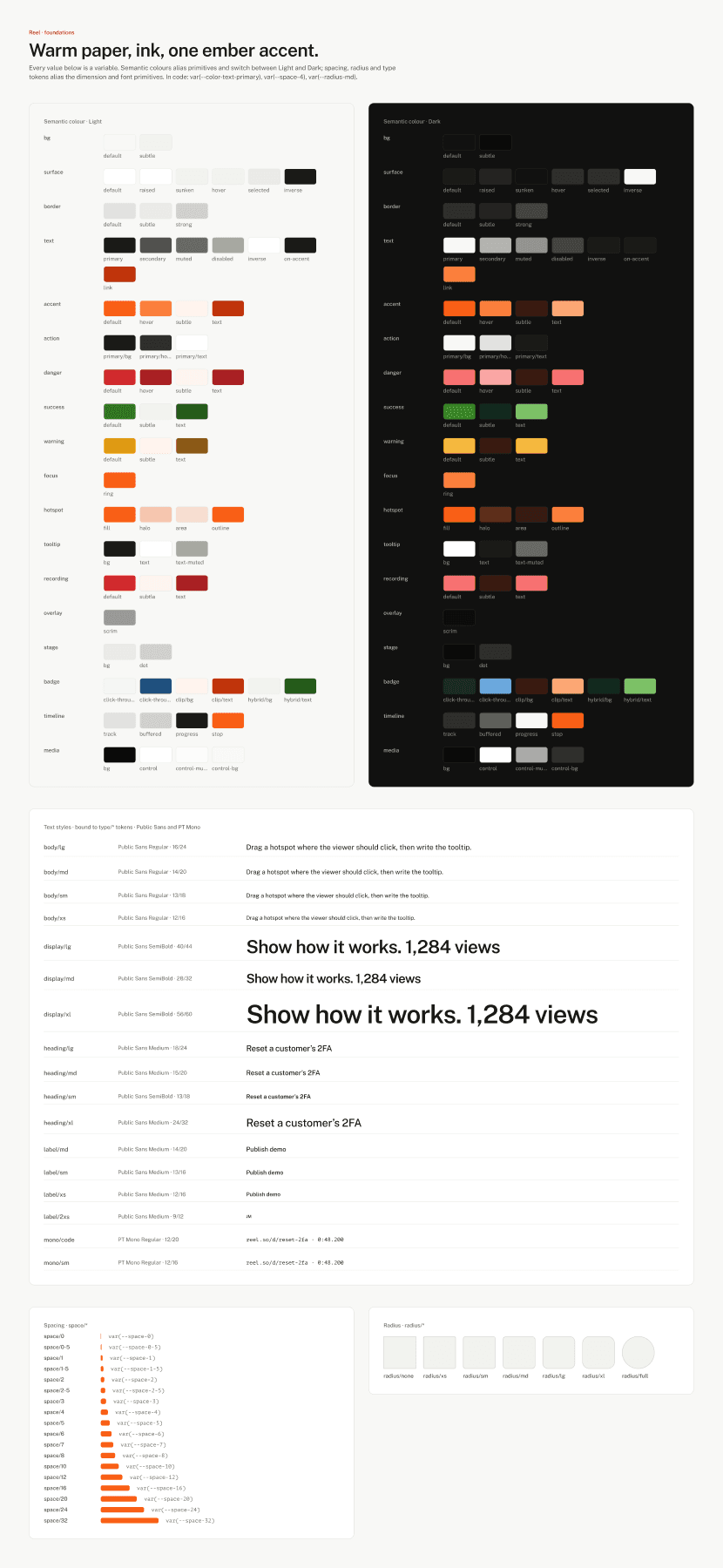
Design system
One set of tokens, in Figma and in code
Variables for colour, type, spacing and radius, then components with every state. Figma's color/text/primary is text-text-primary in code. Every screen in light and dark, desktop and phone, with loading, empty and error states.
Edge cases
Designed alongside the happy path
Vague prompt
Asks one short question.
Can't find it
Pauses, offers a hint, Take over or Stop.
Same action three times
Stops and asks.
Delete, pay or send
Pauses first.
2FA or captcha
The maker steps in.
Cookie banners and tours
Closed, not recorded.
New tabs
Followed in the same tab.
Phones
A phone player with a step sheet.
Dropped Wi-Fi during upload
Carries on.
What I'm measuring at launch
The funnel is built into the product
- Signed up
- Made a workspace
- Made a demo
- Published
- Watched outside the team
- Added a teammate
- Paid
Plus: time to first published demo (under 10 minutes), how much makers edit AI demos, and the Watch / Click through split.
What I'd do differently
Test with the people it's for, sooner
Test the editor with less technical users much earlier. Write the launch scope down first, and check every promise against it. Run review rounds from the first week. I left them to the end, and it showed.
Who did what
I designed it. Claude wrote the code.
I made the product decisions, designed every screen and state in Figma first, and wrote the specs: what each screen does, what the AI may and may not do, and how each state should read. Claude wrote the code from those specs. I then ran six review rounds of the built product against the designs and decided what went in and what waited.
The engineering decisions are in Part 2 below, for anyone who wants them. The stack: Next.js and React, Tailwind with the shared tokens, Supabase, a cloud browser for Describe it, ElevenLabs voice, Lemon Squeezy and a Chrome extension.
Gallery
States the story skips
Sign-in, first run, running low on voice minutes, the extension, and the empty screens. Open any of them full size.
Part 2 · Engineering
How Reel is built
Every release needs demos, and turning a recording into something a customer can follow is the slow part. Reel makes it a sentence: Describe it opens your product in a cloud browser, does the task, and hands back an editable demo. The same tool records clips and hybrids.
What I built
One product, four ways in, three kinds of demo
Click-throughs, clips and hybrids. Describe it, the Chrome extension, the web recorder and uploads. An editor with AI step text, translation, voice-over, auto zoom, trims, chapters, branching, lead forms and step videos. Blur before upload. Links, embeds, password and members-only demos, collections, comments for anyone with the link. Stats and a weekly digest. Plans, seats and AI credits through Lemon Squeezy.
Decision 1
The database enforces the rules, not the screens
Who can read, comment, edit or spend an AI run is decided in Postgres, with row-level security and a few functions. A bug in a screen can show the wrong button, but it can't leak a private demo or give away a paid feature. 46 database test files run every rule as an admin, a maker, an outsider and someone signed out.
A screen asks
Show this demo, add this comment, start a run
Postgres decides
Row-level security, can_comment, plan_limit, try_take_credits
Yes or no
The screen shows what it's allowed
Decision 2
Describe it: one checked move at a time
Claude never drives the browser directly. It sees a screenshot and the task, and answers with one action; Reel checks it, then acts. Sign-in is plain code, so Claude never sees the password. One move per request (Vercel's time limit), with a lease so two tabs can't click twice. A reliability pass added near-miss snapping, new tabs, dropdowns, panels, popups and a loop check, tested in real Chromium.
Screenshot + task
The browser as it is now
Claude picks one move
Click, type, scroll, close a popup, finish or ask
Reel checks it
Never-click words, password fields, allowed domains
Click, then save
The screen before becomes a step, with its hotspot
Decision 3
Private data never leaves the computer unblurred
tesseract.js reads a screenshot's words and MediaPipe finds faces, both in the browser. Matching finds emails, phones, card numbers (Luhn-checked), keys and the workspace's own names. At publish, the browser paints the blurs into a copy; viewers only get the copy, and the server refuses a blurred step without one.
Screenshot
On the maker's computer
Read words and faces
tesseract.js, MediaPipe, in the browser
Find sensitive items
Emails, cards, keys, names
Maker reviews
Part of Start review
Paint into a copy
Viewers get only the copy
Decision 4
Clip edits are data; comments live in the recording's time
Trims and cuts are stored as data, not baked into the video. The player converts between the recording's time and its own clock. Comments are stored in recording time, so trimming later never moves a comment off its moment.
Recording: 0:00 to 2:30
What was captured
Trims and cuts
Stored as data
Player: 0:00 to 2:10
What viewers see
A comment at 1:20 recorded
Shows at its played time, always on its moment
Decision 5
Payments that can't be replayed or forged
The webhook checks Lemon Squeezy's signature, then one database function applies it: only with a secret fingerprint, ignoring older events, and the same order twice counts once. AI usage comes out of one atomic function, so two requests can't both spend the last credit.
Lemon Squeezy event
Subscription or credits order
Signature checked
HMAC of the raw body
One database function
Fingerprint, newest wins, once per order
Plan, seats, credits
Updated together
Decisions 6 and 7
Voice that costs nothing to replay; uploads that survive bad Wi-Fi
Each step's voice is made once and kept; a hash of the line and voice marks it out of date when the words change. Recordings over 6 MB upload in resumable 6 MB pieces, written with plain fetch: after a drop, it asks how far it got and carries on, with a fresh token per piece.
Line + voice
Hashed
Made once
ElevenLabs, on the server
Kept
Replays are free
Words change
Marked out of date
6 MB pieces
TUS, plain fetch
Connection drops
Waits until online
Asks how far
HEAD: Upload-Offset
Carries on
File arrives whole
Decision 8
Measuring activation without a tracking script
Database triggers record the first time each workspace reaches each step, so the app can't forget an event. One query gives the funnel and the median time to each step.
Signed up
Workspace
First demo
Published
Outside view
Teammate
Paid
Decision 9
One set of tokens, from Figma to code
Figma variables share their names with the Tailwind tokens: color/text/primary is text-text-primary. Hex values and one-off sizes aren't allowed in the app, so a design change is made once, and both themes come from the same tokens.
Figma variable
color/text/primary
Same name
Tailwind token
text-text-primary
Tests, and what they caught
Tested where the risk is
| Suite | What it checks | Size |
|---|---|---|
| Database | Every access rule, limit and payment function, as different people | 46 files |
| Browser (Playwright) | Public pages, sign-in, home, player; desktop and phone | 31 tests × 2 |
| Describe it actions | Snapping, new tabs, dropdowns, scrolling, loops, in real Chromium | 12 checks |
| Uploads | Pieces, a dropped connection, duplicates, too large, cancel | 7 checks |
| Billing, blur, emails, step video | Webhook parsing, sensitive words, templates, video edits | 4 scripts |
| Extension | The extension in Chromium against a stand-in API | 1 smoke test |
| Bug | What happened | Fix and lesson |
|---|---|---|
| 2FA codes never typed | One selector broke the whole selector list | Quote every value; caught by test pages, not in production |
| Describe it saw a blank page | The cloud browser's own empty tab was picked | Use the tab that isn't blank; reopen the product once |
| Payments webhook returned 500 | A setup step was skipped on the live database | Setup steps written down and checked off; resend to confirm |
| A migration failed live | It needed an earlier migration that was never applied | A query that lists what's applied; migrations safe to run twice |
| Hybrids interrupted viewers | The video paused at every step | Two modes: Watch and Click through |
What's next, and honesty notes
Waiting on two approvals
Launch waits on Lemon Squeezy's live mode and the Chrome Web Store. After launch: resumable uploads in the extension, email replies for outside commenters, voice cloning with a consent check.
Honesty: no performance budget to report yet; the numbers that matter (time to first published demo, Describe it's success rate) need real users. The Describe it fixes and resumable uploads were tested locally, with live checklists in the specs.